Production monitoring

See events.
In context.

Factory Watch brings camera events, machine data and your plant model into one workspace. Review what happened, where it happened and what the machines were doing.

Factory Watch in motionSimulated production scenes
Event review

Event review

Review the event.
Check the context.

A camera alert tells part of the story. Factory Watch connects it with machine data and a location in your plant model.

  1. 01

    Review the footage.

    Return to recorded video and event clips to see what happened.

  2. 02

    Check machine data.

    Compare the visual record with PLC values from the same operation.

  3. 03

    Investigate and respond.

    Review the evidence with your team and decide what to do next.

Production monitoring

Meet Factory Watch.

Video, machine data
and plant context.

Event review

Video evidence.
Machine context.

Review recorded video alongside PLC values. Use your IFC plant model to locate an event and check nearby cameras and sensors.

  • Camera events with video evidence
  • Machine data through OPC UA
  • Cameras and sensors in your IFC model
Request a demo
Factory WatchProduction event review
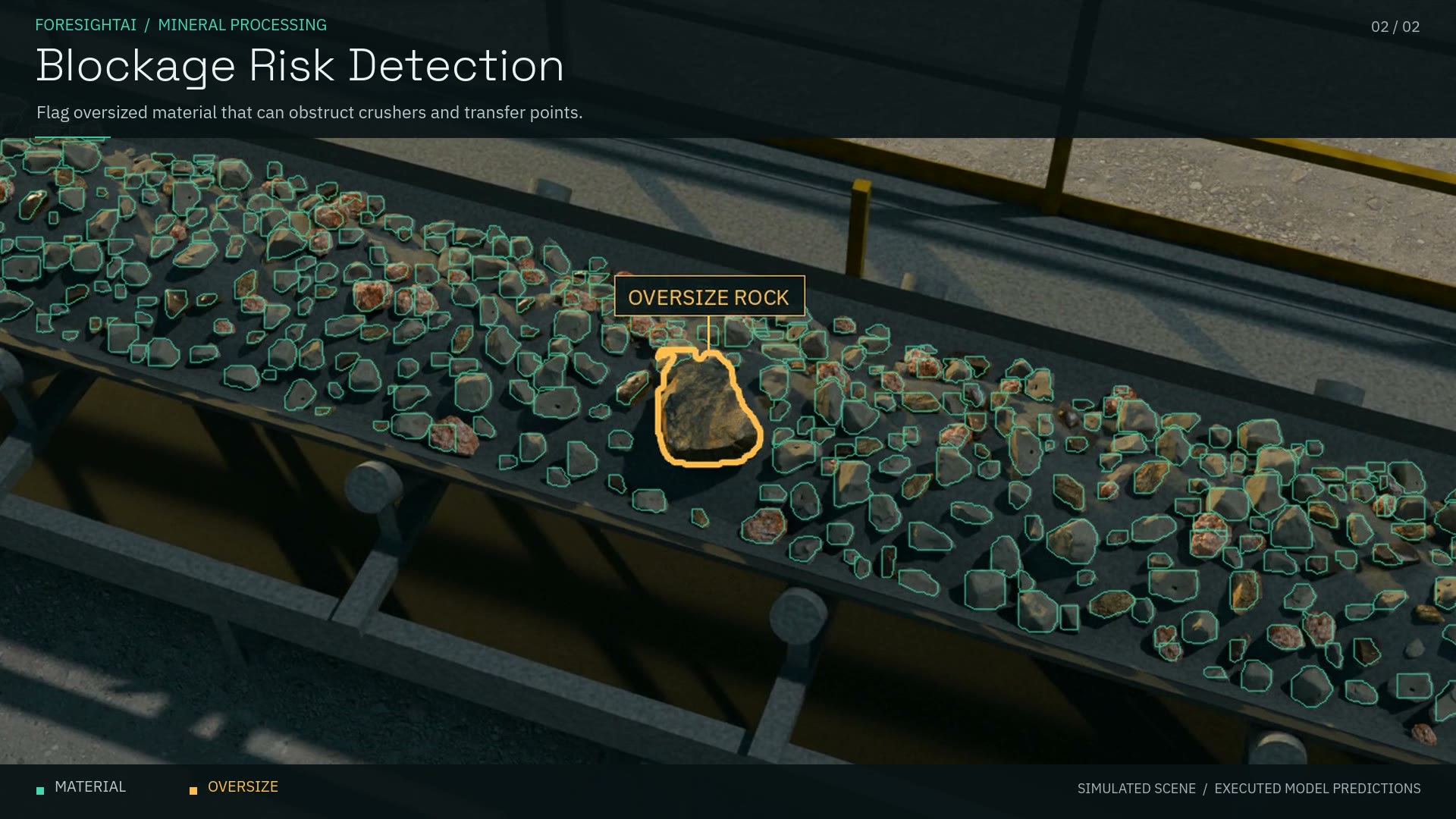
Simulated rock conveyor with individual rocks outlined and an oversized rock highlighted.
Material flow / simulated scene
Event evidence and context
Video evidence
Machine data
Plant location

Factory Watch deployment

At your plant.
In your browser.

On-site vision processing.
A dedicated hosted workspace.

  1. 01 / Connect

    Your production floor

    RTSP camera streams
    PLC data over OPC UA

    At your site
  2. 02 / Process

    On-site edge server

    Vision models and rules
    Video recording and data collection

    NVIDIA GPU at the plant
  3. 03 / Review

    Factory Watch workspace

    Events, video and machine data
    Dashboards and the IFC plant model

    Your organisation’s hosted workspace
The edge initiates outbound connections from the plant.
Deployment & data

Vision models and rules run on an NVIDIA GPU at your site. Recorded video, event clips, detections and PLC values are transferred to your organisation’s dedicated hosted environment. Retention is configured per organisation and camera. Factory Watch requires the hosted workspace and does not support offline operation.

Access & operational scope

Access is by invitation, with TOTP multi-factor authentication and roles per project. Factory Watch provides advisory alerts and evidence. Machine control and certified safety systems retain authority; the application does not replace safety devices or validated inspection systems. Demos use rendered production scenes and simulated PLC data.

Request a demo

Explore
Factory Watch.

Request a two-week Factory Watch workspace with simulated production data. We’ll send your invitation by email.

Factory Watch by ForesightAI

We use your details to answer your request.
Read our privacy policy.

Factory Watch / Production examples

Simulated sawmill, rock-conveyor, pharmaceutical and bottle-inspection scenes. Two close mining views show executed rock-segmentation predictions and oversized-rock highlights; the other segments use illustrative annotations. These scenes do not represent customer deployments or field-accuracy measurements.

Read the film description
  1. Sawmill: Individual logs are marked for tracking as the scene changes between clear conditions, rain, snow and fog.
  2. Bulk material inspection: A close overhead view of a quarry conveyor shows individual rocks outlined in green, using executed single-pass RGB segmentation. The footage is cropped from the full inspection view.
  3. Blockage risk detection: A second close angle highlights oversized material in amber that could obstruct crushers or transfer points and disrupt production. The oversize class belongs to the simulated scene; the film does not demonstrate calibrated size measurement.
  4. Pharmaceutical inspection: Tablet masks and pocket inspection are shown before packages leave the line.
  5. Bottle inspection: Fill level and cap alignment vary, alongside an illustration of operator feedback.
  6. Product counting: Products move across eight simulated lanes while a crossing counter advances.